Better errors in the Panel
A short notification with “An error occurred” isn't much to work with. Kirby 6 gives errors in the Panel the space they need: structured dialogs for failed requests and invalid input, links into your editor and clear messages for blocked actions.
Request error dialog
When a request in a Panel view fails, the Panel opens the new request error dialog in addition to the error notification. It shows:
- the error message
- the request: path, query, HTTP method and status code
- the exception: class, file and line (in debug mode)
- additional details from the exception, if there are any
- the full stack trace in a collapsible section (in debug mode)
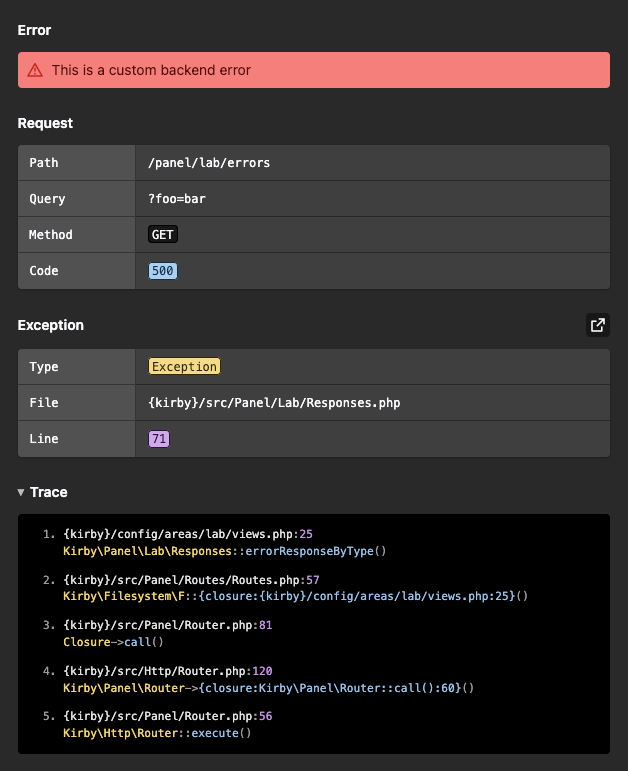
File paths are shortened to placeholders like {kirby}, {site} or {index} so that error responses don't expose the folder structure of your server.
Jump to the line in your editor
If you set up the editor option in debug mode, the dialog gets a button that opens the file of the exception at the right line in your code editor. Each entry of the stack trace links to its file and line as well.
return [
    'debug'  => true,
    'editor' => 'vscode'
];
This works for the same editors that the error page of your site already supports, e.g. vscode, phpstorm or sublime.
Stack traces
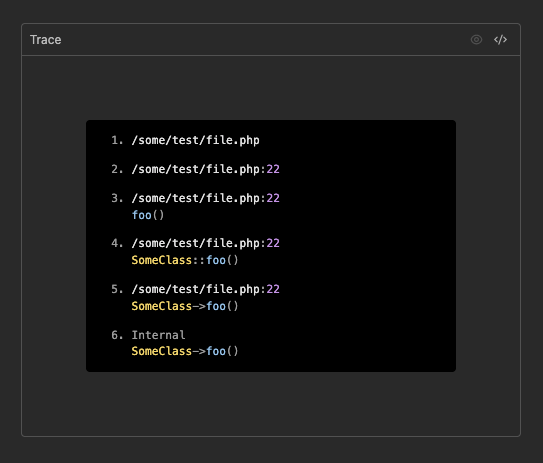
The stack trace in the dialog is rendered by the new <k-error-trace> component. It lists every step that led to the error with file, line, class and function.
Validation error dialog
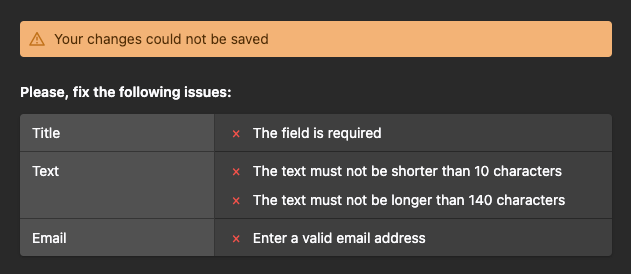
When the Panel cannot save your changes because some fields are invalid, the new validation error dialog lists every issue, grouped by field. Instead of a single long error string, you see at a glance which fields need your attention and why.
For plugin developers
The new components are available for your own Panel plugins:
| Component | Purpose |
|---|---|
<k-request-error-dialog> |
Dialog for a failed request |
<k-validation-error-dialog> |
Dialog that lists invalid fields |
<k-error-trace> |
Renders a PHP stack trace, e.g. from an error response |
<k-validation-issues> |
Lists issues per field, also outside of dialogs |
<template>
    <k-validation-issues :fields="issues" />
</template>

<script>
export default {
    data() {
        return {
            issues: {
                title: {
                    label: "Title",
                    issues: ["The field is required"]
                },
                email: {
                    label: "Email",
                    issues: ["Enter a valid email address"]
                }
            }
        };
    }
};
</script>