# Page builder

(screencast: https://www.youtube.com/watch?v=eOoGMmQbre8 title: A closer look at the blocks field)

****

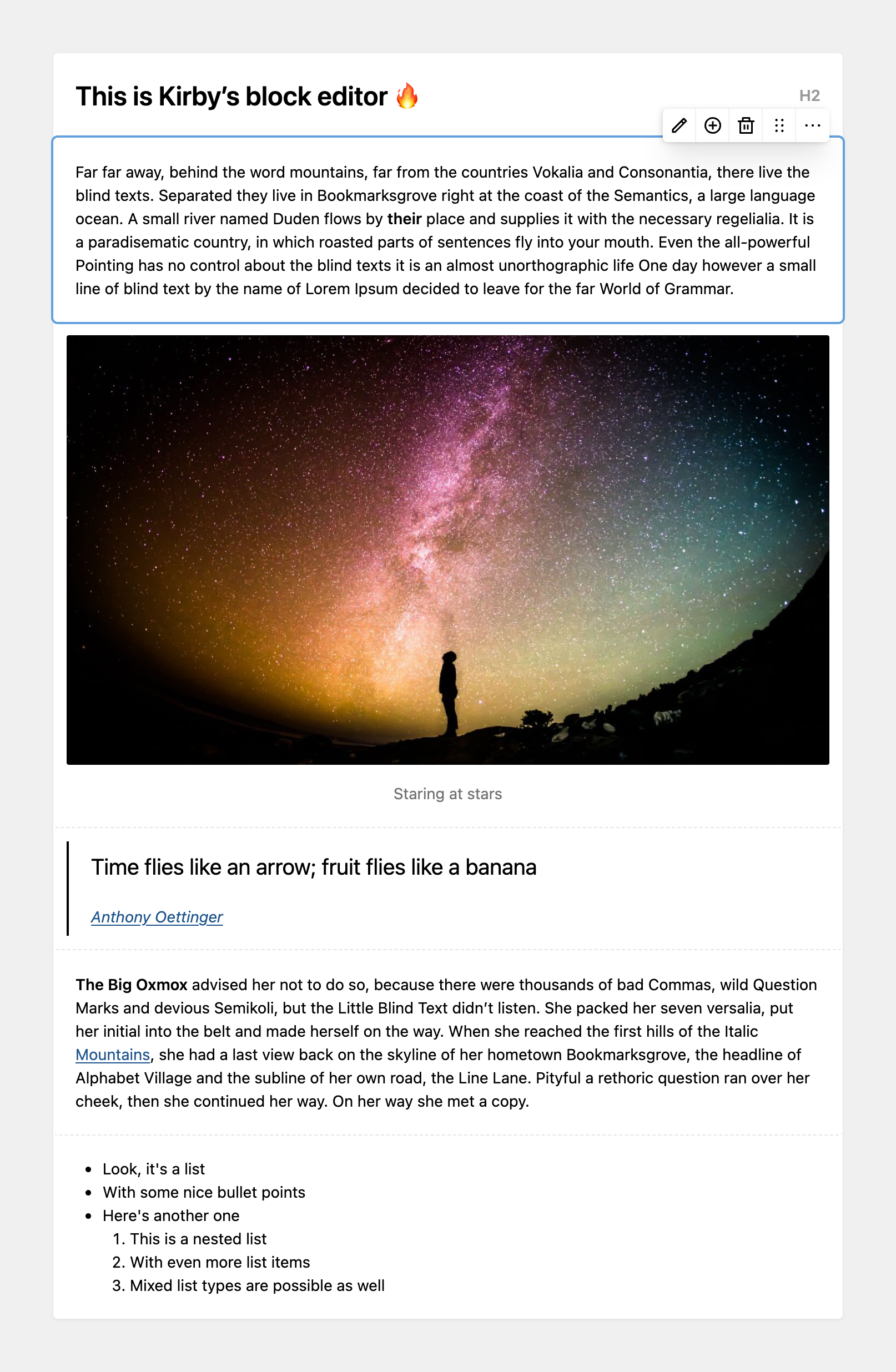
<figure class="image"><a data-lightbox href="https://assets.getkirby.com/media/pages/docs/guide/page-builder/5c10cd0f67-1717846665/blocks.png?width=1614&amp;height=2472&amp;enlarge=0"><img alt="" class="rounded" height="1415" loading="lazy" sizes="auto" src="https://assets.getkirby.com/media/pages/docs/guide/page-builder/5c10cd0f67-1717846665/blocks.png?width=924&amp;height=1415&amp;enlarge=0" srcset="https://assets.getkirby.com/media/pages/docs/guide/page-builder/5c10cd0f67-1717846665/blocks.png?width=462&amp;height=708&amp;enlarge=0 462w, https://assets.getkirby.com/media/pages/docs/guide/page-builder/5c10cd0f67-1717846665/blocks.png?width=690&amp;height=1057&amp;enlarge=0 690w, https://assets.getkirby.com/media/pages/docs/guide/page-builder/5c10cd0f67-1717846665/blocks.png?width=924&amp;height=1415&amp;enlarge=0 924w, https://assets.getkirby.com/media/pages/docs/guide/page-builder/5c10cd0f67-1717846665/blocks.png?width=1380&amp;height=2114&amp;enlarge=0 1380w, https://assets.getkirby.com/media/pages/docs/guide/page-builder/5c10cd0f67-1717846665/blocks.png?width=1614&amp;height=2472&amp;enlarge=0 1848w" width="924"></a></figure>

## Like Lego® bricks for your content

Blocks are basically like Lego® bricks, but for text and layout. Combine them in whatever way you like to create unique long form content and even complete page layouts without ever leaving the Panel.

While <abbr title="A markup language that uses plain text formatting syntax and can be converted to HTML and other formats. Created by John Gruber in 2004."><a href="https://getkirby.com/docs/glossary/#markdown">Markdown</a></abbr> is great for writing long form text like articles with nothing but a text editor, it doesn't provide a very visual experience, particularly when it comes to integrating rich content elements.

This is where Kirby's <a href="https://getkirby.com/docs/reference/panel/fields/blocks">blocks</a> and <a href="https://getkirby.com/docs/reference/panel/fields/layout">layout</a> fields shine brightly: Blocks are the perfect solution for complex single-column layouts and long-form text with images, galleries, code, embedded media and more. With the layout field, you take this one step further to arrange blocks in multiple columns to build complex page layouts.

Together, Kirby's blocks and layout fields combine a great WYSIWYG editing experience with fully customizable, flexible blocks. And you can easily extend the default blocks collection with your own or blocks from community plugins. And the best thing is: The HTML output is totally under your control, so it works nicely with your favorite CSS framework, e.g. <a href="https://tailwindcss.com/">Tailwind CSS</a> and others.

## Core block types

Kirby comes with the following block types built-in:

<nav class="auto-fill mb-12 text-sm" style="--min: 20rem; --gap: var(--spacing-1)">
		<a class="block p-3 bg-light" href="https://getkirby.com/docs/reference/panel/blocks/code" style="text-decoration: none">
		<strong class="block">code</strong>
		An inline code block for code snippets and examples.	</a>
		<a class="block p-3 bg-light" href="https://getkirby.com/docs/reference/panel/blocks/gallery" style="text-decoration: none">
		<strong class="block">gallery</strong>
		A list of images to create galleries of all sorts	</a>
		<a class="block p-3 bg-light" href="https://getkirby.com/docs/reference/panel/blocks/heading" style="text-decoration: none">
		<strong class="block">heading</strong>
		Headline from &lt;h1&gt; to &lt;h6&gt;	</a>
		<a class="block p-3 bg-light" href="https://getkirby.com/docs/reference/panel/blocks/image" style="text-decoration: none">
		<strong class="block">image</strong>
		A single image	</a>
		<a class="block p-3 bg-light" href="https://getkirby.com/docs/reference/panel/blocks/line" style="text-decoration: none">
		<strong class="block">line</strong>
		A separating line (hr)	</a>
		<a class="block p-3 bg-light" href="https://getkirby.com/docs/reference/panel/blocks/list" style="text-decoration: none">
		<strong class="block">list</strong>
		Ordered and unordered lists	</a>
		<a class="block p-3 bg-light" href="https://getkirby.com/docs/reference/panel/blocks/markdown" style="text-decoration: none">
		<strong class="block">markdown</strong>
		A plaintext HTML/markdown/kirbytext block. This is perfect to combine WYSIWYG content with custom HTML, Kirbytext or Markdown.	</a>
		<a class="block p-3 bg-light" href="https://getkirby.com/docs/reference/panel/blocks/quote" style="text-decoration: none">
		<strong class="block">quote</strong>
		A quote with optional citation	</a>
		<a class="block p-3 bg-light" href="https://getkirby.com/docs/reference/panel/blocks/table" style="text-decoration: none">
		<strong class="block">table</strong>
		A table block based on the structure field	</a>
		<a class="block p-3 bg-light" href="https://getkirby.com/docs/reference/panel/blocks/text" style="text-decoration: none">
		<strong class="block">text</strong>
		A simple text block with multiple paragraphs	</a>
		<a class="block p-3 bg-light" href="https://getkirby.com/docs/reference/panel/blocks/video" style="text-decoration: none">
		<strong class="block">video</strong>
		A Youtube or Vimeo video embed	</a>
	</nav>


## Adding blocks field to your blueprint

Add `blocks` and `layout` fields to your blueprints like any other field type. Check out our detailed reference for each field type with all the available configuration options:

- <a href="https://getkirby.com/docs/reference/panel/fields/blocks">Blocks field</a>
- <a href="https://getkirby.com/docs/reference/panel/fields/layout">Layout field</a>

## Third-party block plugins

Our community of Kirby developers have created cool blocks field plugins, so make sure to check them out:

- <a href="https://getkirby.com/plugins/lukasbestle/downloads">Downloads block</a>
- <a href="https://getkirby.com/plugins/plain-solutions/map">Map-Suite: A geolocation field &amp; map block</a>
- <a href="https://getkirby.com/plugins/plain-solutions/formblock">Form block: Create forms easily from building blocks</a>
- <a href="https://getkirby.com/plugins/plain-solutions/grid-block">Grid block: Use layouts right within any blocks field</a>
- <a href="https://getkirby.com/plugins/jongacnik/fields-block">Fields block: Kirby block preview plugin to directly render block fields, allowing for inline editing</a>
- <a href="https://getkirby.com/plugins/johannschopplich/highlighter">Highlighter: Syntax highlighting for code</a>

Already made your own? Don't hesitate to <a href="https://getkirby.com/docs/guide/plugins/plugin-setup-basic#publish-your-plugin">share them with the world</a>.

****

## More information

- [Nested blocks](https://getkirby.com/docs/cookbook/content-structure/nested-blocks.md)
- [Kirby meets Tailwind CSS](https://getkirby.com/docs/cookbook/frontend/kirby-meets-tailwindcss.md)