# Basic blueprint knowledge

Blueprints are configuration files written in YAML that let you customize the <abbr title="The Panel is Kirby's fast and powerful web interface to manage your website in the browser. The Panel is highly customizable in many ways for different project needs."><a href="https://getkirby.com/docs/glossary/#panel">Panel</a></abbr> to make it truly yours.

****

(screencast: https://www.youtube.com/watch?v=yK3gNjWU_5s title: Your first blueprints text: The heart and soul of your Kirby installation: Learn how to create a fully customized admin interface for every page type.)

****

## TL;DR

- Blueprints are stored in `/site/blueprints`.
- Blueprints configure the Panel layout of the site, pages, files and users.
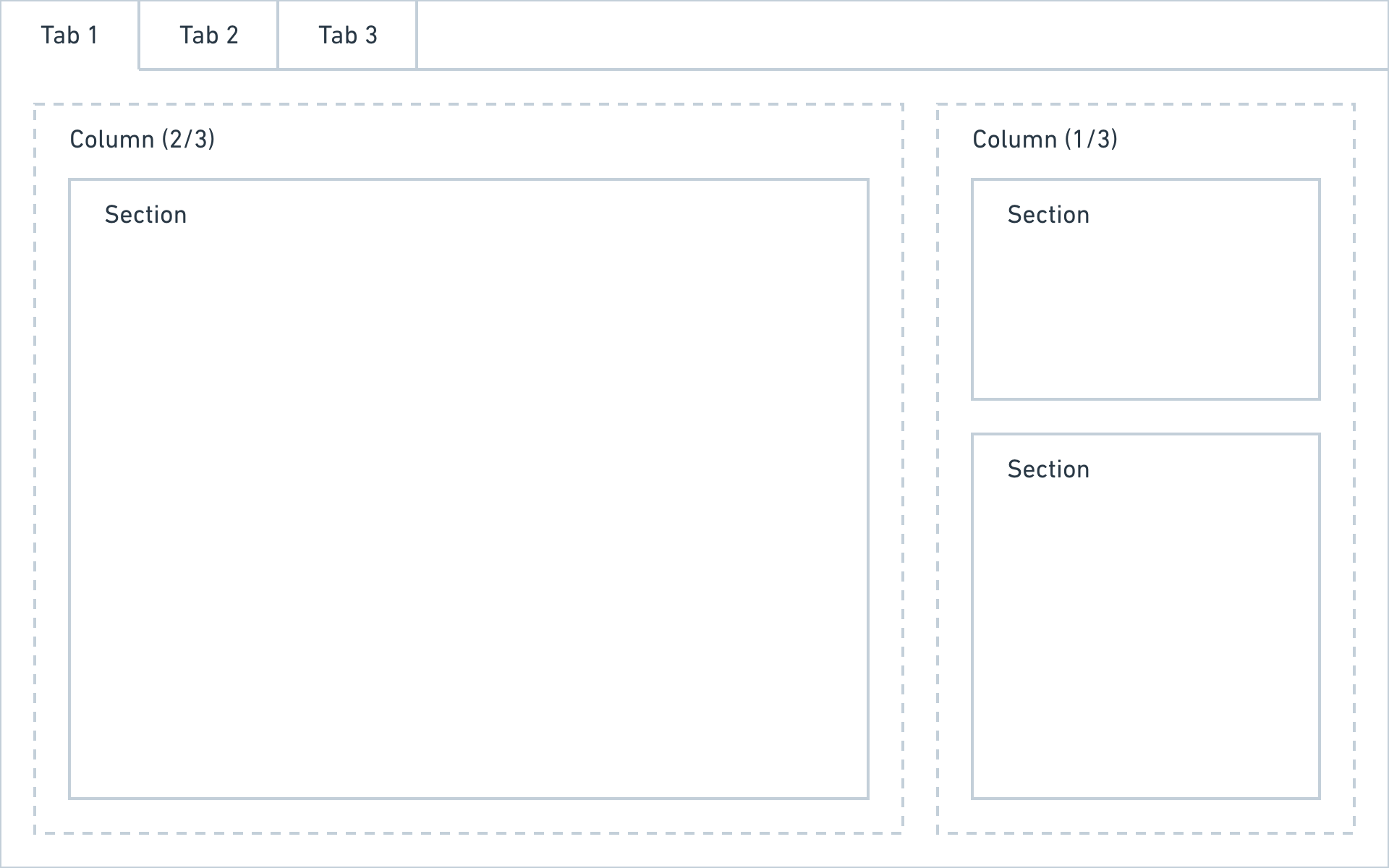
- Create your own layouts with tabs, columns and sections.

## Blueprint types

The Panel layouts for  `site`, `pages`, `files` and `users` all get their own blueprints. The blueprint folder is structured accordingly:

```filesystem
/site/blueprints/site.yml
/site/blueprints/files/
/site/blueprints/pages/
/site/blueprints/users/
```

<nav class="auto-fill mb-12 text-sm" style="--min: 20rem; --gap: var(--spacing-1)">
		<a class="block p-3 bg-light" href="https://getkirby.com/docs/reference/panel/blueprints/block" style="text-decoration: none">
		<strong class="block">Block blueprint</strong>
		Block blueprints are located in /site/blueprints/blocks and control the setup and form fields for a block type.	</a>
		<a class="block p-3 bg-light" href="https://getkirby.com/docs/reference/panel/blueprints/file" style="text-decoration: none">
		<strong class="block">File blueprint</strong>
		File blueprints are located in /site/blueprints/files and control the Panel setup and form fields for individual file types.	</a>
		<a class="block p-3 bg-light" href="https://getkirby.com/docs/reference/panel/blueprints/page" style="text-decoration: none">
		<strong class="block">Page blueprint</strong>
		Page blueprints are located in /site/blueprints/pages and control the Panel setup and form fields for pages.	</a>
		<a class="block p-3 bg-light" href="https://getkirby.com/docs/reference/panel/blueprints/site" style="text-decoration: none">
		<strong class="block">Site blueprint</strong>
		The Site blueprint is located in /site/blueprints and controls the Panel setup and form fields for the site/dashboard.	</a>
		<a class="block p-3 bg-light" href="https://getkirby.com/docs/reference/panel/blueprints/user" style="text-decoration: none">
		<strong class="block">User blueprint</strong>
		User blueprints are located in /site/blueprints/users and control the Panel setup, form fields and permissions for a user role.	</a>
	</nav>

<info>
The start page (Dashboard) of the Panel is defined in the `/site/blueprints/site.yml` blueprint.
</info>

## Fields

With fields you can break up your content into digestible chunks and structure it according to your content model, rather than storing everything in a huge text field. You can add as many fields of different field types as you need.

<a href="https://getkirby.com/docs/guide/blueprints/fields">Learn more about fields&hellip;</a>

## Layout

When your project requires more elaborate setups, you can be the interface designer. You decide which features are needed for each type of page, file or user and how to arrange them in <a href="https://getkirby.com/docs/guide/blueprints/layout#tabs">tabs</a>, <a href="https://getkirby.com/docs/guide/blueprints/layout#columns">columns</a> and <a href="https://getkirby.com/docs/guide/blueprints/layout#sections">sections</a>.

<figure class="image"><a data-lightbox href="https://assets.getkirby.com/media/pages/docs/guide/blueprints/introduction/cbb5422577-1717846665/tabs.png?width=1920&amp;height=1200&amp;enlarge=0"><img alt="" class="rounded" height="578" loading="lazy" sizes="auto" src="https://assets.getkirby.com/media/pages/docs/guide/blueprints/introduction/cbb5422577-1717846665/tabs.png?width=924&amp;height=578&amp;enlarge=0" srcset="https://assets.getkirby.com/media/pages/docs/guide/blueprints/introduction/cbb5422577-1717846665/tabs.png?width=462&amp;height=289&amp;enlarge=0 462w, https://assets.getkirby.com/media/pages/docs/guide/blueprints/introduction/cbb5422577-1717846665/tabs.png?width=690&amp;height=431&amp;enlarge=0 690w, https://assets.getkirby.com/media/pages/docs/guide/blueprints/introduction/cbb5422577-1717846665/tabs.png?width=924&amp;height=578&amp;enlarge=0 924w, https://assets.getkirby.com/media/pages/docs/guide/blueprints/introduction/cbb5422577-1717846665/tabs.png?width=1380&amp;height=863&amp;enlarge=0 1380w, https://assets.getkirby.com/media/pages/docs/guide/blueprints/introduction/cbb5422577-1717846665/tabs.png?width=1848&amp;height=1155&amp;enlarge=0 1848w" width="924"></a></figure>

<a href="https://getkirby.com/docs/guide/blueprints/layout">Learn more about layouts&hellip;</a>

## Query language

Kirby comes with a blueprint query language that offers basically the same functionality as Kirby's PHP API with a simple dot notation.

<a href="https://getkirby.com/docs/guide/blueprints/query-language">Learn more about Kirby&#039;s blueprint query language&hellip;</a>

## Extending blueprints

You can store fields, sections, tabs and entire blueprint layouts in separate files so that they can be reused within your blueprints. If you want, you can even create a complete component system to apply to multiple projects.

<a href="https://getkirby.com/docs/guide/blueprints/extending-blueprints">Learn more about how to extend and reuse blueprints&hellip;</a>

## Translating blueprints

For editors from various language backgrounds, you can translate blueprint titles, form field labels, section labels, help text, options, and more.

<a href="https://getkirby.com/docs/guide/blueprints/translations">Learn more about translating blueprints&hellip;</a>

## Example blueprints

We have put together an extensive collection of example blueprints for typical setups like a blog, a shop, a project portfolio and more for you to use as a basis for your own.

<a href="https://getkirby.com/docs/reference/panel/samples">Check out the example blueprints&hellip;</a>

## More docs

Our reference has more in-depth documentation about blueprints and their different components.

<a href="https://getkirby.com/docs/reference/panel">Check out the reference&hellip;</a>

## Tips & Tricks

### Using special characters in blueprint labels etc.

To use special characters in labels etc., wrap the text in double quotes:

```yaml
field1:
  label: "Fotograf*in"
  type: text
field2:
  label: "Must do: this"
  type: text
```

### Naming fields

Make sure to only use alpha-numerical characters and underscores in field names. You cannot use dashes.

Yes:

```yaml
field_1:
  label: Headline
  type: text
```

No:

```yaml
field-1:
  label: Headline
  type: text
```