# Info

A plain HTML field for user instructions

****

- Read more: <https://getkirby.com/docs/guide/blueprints/fields>
- Source: <https://github.com/getkirby/kirby/tree/5.5.3/config/fields/info.php>

****

The info field is a great way to provide inline help or information for your users. You can put any kind of text in this field and it will be displayed as plain text. For better formatting you can use <abbr title="A markup language that uses plain text formatting syntax and can be converted to HTML and other formats. Created by John Gruber in 2004."><a href="https://getkirby.com/docs/glossary/#markdown">Markdown</a></abbr> and <abbr title="KirbyText is Kirby's extended version of John Gruber's popular Markdown syntax. KirbyText helps with adding images, files, internal links, etc. KirbyText can be extended with custom tags and filters."><a href="https://getkirby.com/docs/glossary/#kirbytext">KirbyText</a></abbr>.

<figure class="image"><a data-lightbox href="https://assets.getkirby.com/media/pages/docs/reference/panel/fields/info/b85da5a399-1717846665/info.png?width=1416&amp;height=574&amp;enlarge=0"><img alt="" class="rounded" height="375" loading="lazy" sizes="auto" src="https://assets.getkirby.com/media/pages/docs/reference/panel/fields/info/b85da5a399-1717846665/info.png?width=924&amp;height=375&amp;enlarge=0" srcset="https://assets.getkirby.com/media/pages/docs/reference/panel/fields/info/b85da5a399-1717846665/info.png?width=462&amp;height=187&amp;enlarge=0 462w, https://assets.getkirby.com/media/pages/docs/reference/panel/fields/info/b85da5a399-1717846665/info.png?width=690&amp;height=280&amp;enlarge=0 690w, https://assets.getkirby.com/media/pages/docs/reference/panel/fields/info/b85da5a399-1717846665/info.png?width=924&amp;height=375&amp;enlarge=0 924w, https://assets.getkirby.com/media/pages/docs/reference/panel/fields/info/b85da5a399-1717846665/info.png?width=1380&amp;height=559&amp;enlarge=0 1380w, https://assets.getkirby.com/media/pages/docs/reference/panel/fields/info/b85da5a399-1717846665/info.png?width=1416&amp;height=574&amp;enlarge=0 1848w" width="924"></a></figure>

## Example

```yaml
fields:
  info:
    label: Info
    type: info
    text: |
      Dear editor,

      each project should have a **cover.jpg**, which will be displayed in the project overview. You should also make sure to fill in all fields correctly.

      In love,
      Your admin
```

## Field properties


<div class="table">
	<table class="parameters">
		<thead>
			<tr>
				<th>Name</th>
				<th>Type</th>
				<th>Default</th>

								<th>Description</th>
							</tr>
		</thead>
		<tbody>
						<tr>
				<td>
					help				</td>
				<td><code class="type type-mixed">mixed</code></td>

				<td data-label="Default:">
															<code>null</code>
									</td>

								<td>Optional help text below the field</td>
							</tr>
						<tr>
				<td>
					icon				</td>
				<td><code class="type type-string">string</code></td>

				<td data-label="Default:">
															<code>null</code>
									</td>

								<td>Optional icon that will be shown at the end of the field</td>
							</tr>
						<tr>
				<td>
					label				</td>
				<td><code class="type type-mixed">mixed</code></td>

				<td data-label="Default:">
															<code>null</code>
									</td>

								<td>The field label can be set as string or associative array with translations</td>
							</tr>
						<tr>
				<td>
					text				</td>
				<td><code class="type type-mixed">mixed</code></td>

				<td data-label="Default:">
															<code>null</code>
									</td>

								<td>Text to be displayed</td>
							</tr>
						<tr>
				<td>
					theme				</td>
				<td><code class="type type-string">string</code></td>

				<td data-label="Default:">
															<code>null</code>
									</td>

								<td>Change the design of the info box</td>
							</tr>
						<tr>
				<td>
					when				</td>
				<td><code class="type type-mixed">mixed</code></td>

				<td data-label="Default:">
															<code>null</code>
									</td>

								<td>Conditions when the field will be shown (since 3.1.0)</td>
							</tr>
						<tr>
				<td>
					width				</td>
				<td><code class="type type-string">string</code></td>

				<td data-label="Default:">
															<code>'1/1'</code>
									</td>

								<td>The width of the field in the field grid, e.g. <code class="type">1/1</code>, <code class="type">1/2</code>, <code class="type">1/3</code>, <code class="type">1/4</code>, <code class="type">2/3</code>, <code class="type">3/4</code></td>
							</tr>
					</tbody>
	</table>
</div>

## Using `KirbyText`

In addition to markdown, you can use `KirbyText` in your info text, even including images:

```yaml
info:
  text: "Check out the &lpar;link: help text: help pages) for details"
```

## Themes

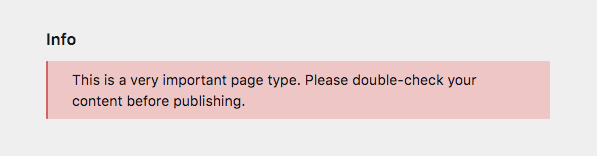
The info field is displayed as a blue info box. You can switch the theme with the `theme` option, to match the importance or meaning of the information.

### Available themes

- `info` (default)
- `positive`
- `negative`
- `notice`
- `warning`
- `passive`
- `text`
- `dark`
- `code`
- `empty`

```yaml
fields:
  info:
    label: Info
    type: info
    theme: negative
    text: This is a very important page type. Please double-check your content before publishing.
```

<figure class="image"><a data-lightbox href="https://assets.getkirby.com/media/pages/docs/reference/panel/fields/info/f904bdb583-1717846665/info-negative.png?width=597&amp;height=156&amp;enlarge=0"><img alt="" class="rounded" height="156" loading="lazy" sizes="auto" src="https://assets.getkirby.com/media/pages/docs/reference/panel/fields/info/f904bdb583-1717846665/info-negative.png?width=597&amp;height=156&amp;enlarge=0" srcset="https://assets.getkirby.com/media/pages/docs/reference/panel/fields/info/f904bdb583-1717846665/info-negative.png?width=462&amp;height=121&amp;enlarge=0 462w, https://assets.getkirby.com/media/pages/docs/reference/panel/fields/info/f904bdb583-1717846665/info-negative.png?width=597&amp;height=156&amp;enlarge=0 690w, https://assets.getkirby.com/media/pages/docs/reference/panel/fields/info/f904bdb583-1717846665/info-negative.png?width=597&amp;height=156&amp;enlarge=0 924w, https://assets.getkirby.com/media/pages/docs/reference/panel/fields/info/f904bdb583-1717846665/info-negative.png?width=597&amp;height=156&amp;enlarge=0 1380w, https://assets.getkirby.com/media/pages/docs/reference/panel/fields/info/f904bdb583-1717846665/info-negative.png?width=597&amp;height=156&amp;enlarge=0 1848w" width="597"></a></figure>

### Disable theming

You can disable the infobox theme entirely to show neutral text.

```yaml
fields:
  info:
    label: Info
    type: info
    theme: none
    text: This is a very neutral message.
```